


How to Reset Cadillac CUE?
Frank Boucher Cadillac
Hard reset and factory reset steps for your Cadillac User Experience system, from our Cadillac service team in Racine, WI.
Quick answer
To hard reset Cadillac CUE, park your Cadillac, start it, then press and hold the “End Call” button on the steering wheel for about 20 seconds, until the center display turns off. Release it and the system restarts in about 5 to 10 seconds, with your personal settings intact. If the problem is still there, open the settings menu and choose “Return to Factory Settings.” Keep in mind a factory reset can erase saved preferences and paired devices.
At Frank Boucher Cadillac, we are exceptionally proud to be known as the go-to Cadillac dealership for those in Racine, WI. We’re also proud to be associated with the Cadillac brand, which continues to produce one iconic model after another. From our proactive and always-helpful sales and finance team to a parts and service team that are experts on all things Cadillac-related, we promise you’ll enjoy every interaction with our team.
One of the more common requests we receive concerns the Cadillac CUE reset. For some customers, the Cadillac CUE system is unknown, and a CUE reset is completely foreign. However, the process behind a Cadillac CUE hard reset is straightforward. So, if you have been wondering why your Cadillac CUE reset is not working or have wanted to know more about the Cadillac CUE hidden menu, this guide is for you.
Key takeaways
- CUE stands for Cadillac User Experience and first arrived in 2012 on the Cadillac XTS.
- Always try a hard reset first. It clears temporary software problems without deleting your personal settings.
- The hard reset uses the “End Call” button on your steering wheel, held for about 20 seconds.
- A factory reset can erase saved preferences and paired devices, so plan to pair your phone again.
- Both resets should be done with your Cadillac parked and stationary.
What is the Cadillac CUE?
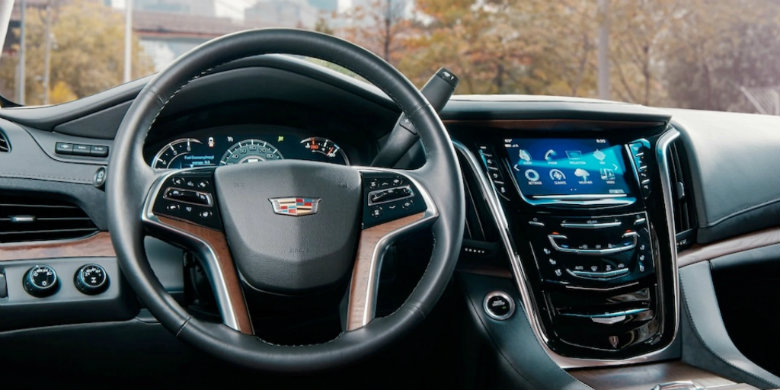
CUE stands for Cadillac User Experience. The Cadillac CUE is built into your Cadillac’s touchscreen where the entertainment and navigation features are found. It was introduced in 2012 with the Cadillac XTS.
The Cadillac CUE combines the entertainment, navigation, communication, and other vehicle settings into one feature. This means it controls your Cadillac’s radio, streaming, Bluetooth connectivity, and navigation. The CUE is operated via voice commands while also being able to integrate your smartphone.
Ultimately, the most common issues with the CUE include frozen screens, delayed responses once users touch the touchscreen, small software glitches, and connectivity issues for Bluetooth. While these issues are rare, they are more prevalent in older CUE systems.
A reset helps to resolve the most common user issues.
How Do You Perform a Cadillac CUE Hard Reset?
While a factory reset restores the CUE to its original factory settings, which may eliminate or delete some of your personal settings, a hard reset is used to resolve temporary software problems without deleting your personal settings. It’s always best to start with a hard reset before considering a factory reset.
The first all-important step is to ensure you have parked your Cadillac. It must be stationary when doing the hard reset. Second, start your Cadillac. This will provide electrical power to the CUE system. You’ll then locate the “End Call” button on your Cadillac’s steering wheel. This is the same button you use when ending phone calls.
Press and hold that “End Call” button for about 20 seconds. Your service screen should appear. Keep holding that button until your center display turns off. This process is your Cadillac’s infotainment system rebooting. Next, wait about 5 to 10 seconds. Your Cadillac welcome screen should then pop up as your CUE system restarts.
After the system has restarted, you can then check the screen, entertainment, navigation, audio settings, paired devices, and Bluetooth to see if you have successfully resolved the problem.
Cadillac CUE Hard Reset: Step by Step
- Park your Cadillac (ensure it is stationary).
- Start your Cadillac.
- Locate the “End Call” button on the steering wheel.
- Press and hold the “End Call” button for approximately 20 seconds.
- Continue holding the button until the center display turns off.
- Release the button and wait approximately 5–10 seconds.
- Wait for the Cadillac welcome screen to appear.
- Check the touchscreen, navigation, audio, and Bluetooth functions to confirm the system is working properly.
How Do You Perform a Cadillac CUE Factory Reset?
If you tried a hard reset and things didn’t improve, then a factory reset should be tried. Again, the first step in a CUE reset is to ensure your Cadillac is stationary. Second, turn on your Cadillac’s ignition. This will power the CUE touchscreen and allow you to access your CUE system controls. Third, access the settings menu. You should be able to locate your Cadillac’s infotainment configuration options.
Next, select “Return to Factory Settings”. This will open the CUE system reset options. Depending on the make, year, and model of your Cadillac, the options can include clearing any of your personal data, clearing or restoring your radio settings, or restoring your vehicle settings.
Cadillac provides all the information on-screen in terms of instructions. Simply follow those on-screen instructions to complete your CUE reset. Please be aware that a factory reset could erase your saved preferences. It can also eliminate any paired devices or other personal information.
Once the reset is confirmed, you will have to restore your personal settings and will likely need to pair your devices again.
Cadillac CUE Factory Reset: Step by Step
- Park the Cadillac (ensure it is stationary)
- Turn on the ignition
- Open the settings menu
- Select “Return to Factory Settings”
- Choose the correct reset option
- Confirm the reset
- Reset your personal preferences
- Pair your devices again.
Cadillac CUE Hard Reset vs. Factory Reset
Not sure which reset fits your situation? Here is how the two compare side by side.
Hard reset
What it does
Reboots the infotainment system to clear temporary software problems.
Your personal settings
Kept. A hard reset does not delete your personal settings.
How to start it
Press and hold the “End Call” steering wheel button for about 20 seconds.
When to use it
First, before considering a factory reset.
Factory reset
What it does
Restores CUE to its original factory settings.
Your personal settings
May be erased, along with paired devices and other personal information.
How to start it
Open the settings menu and select “Return to Factory Settings.”
When to use it
When a hard reset didn’t improve things.
Contact Frank Boucher Cadillac if Your CUE System Isn’t Working
If you’ve tried both a hard reset and a factory reset and feel frustrated because your Cadillac CUE reset isn’t working, then it’s time to call our service department. Our team comprises factory-trained Cadillac mechanics and technicians alongside Cadillac expert parts and service personnel who know exactly how to troubleshoot the most common Cadillac issues.
If you own a Cadillac and need help with your CUE system, contact us now.
Cadillac CUE Reset FAQs
How do I reset my Cadillac CUE screen?
Start with a hard reset. With your Cadillac parked and running, press and hold the “End Call” button on the steering wheel for about 20 seconds, until the center display turns off. Release it, wait about 5 to 10 seconds, and the Cadillac welcome screen will appear as CUE restarts.
Will a Cadillac CUE hard reset delete my settings?
No. A hard reset clears temporary software problems without deleting your personal settings. That’s why we recommend trying it before a factory reset.
What’s the difference between a hard reset and a factory reset on Cadillac CUE?
A hard reset reboots the infotainment system and keeps your personal settings. A factory reset restores CUE to its original factory settings and can erase saved preferences, paired devices, and other personal information.
How do I factory reset Cadillac CUE?
Park your Cadillac and turn on the ignition. Open the settings menu, select “Return to Factory Settings,” choose the reset option you need, and confirm. Cadillac walks you through the rest with on-screen instructions.
Do I have to pair my phone again after a CUE factory reset?
Most likely, yes. A factory reset can remove paired devices, so plan to restore your personal settings and pair your devices again once the reset is confirmed.
Can I reset Cadillac CUE while driving?
No. Your Cadillac needs to be parked and stationary for both a hard reset and a factory reset.
What are the most common Cadillac CUE problems?
The most common issues are frozen screens, delayed responses to touch, small software glitches, and Bluetooth connectivity issues. They’re rare, and they show up more often in older CUE systems.
What does CUE stand for on a Cadillac?
CUE stands for Cadillac User Experience. It debuted in 2012 on the Cadillac XTS and brings entertainment, navigation, communication, and vehicle settings together on your touchscreen.
What should I do if my Cadillac CUE reset isn’t working?
If you’ve tried both a hard reset and a factory reset, reach out to the Frank Boucher Cadillac service department in Racine, WI. Our factory-trained Cadillac technicians know how to troubleshoot the most common CUE issues.
CUE still giving you trouble?
Our Cadillac service team in Racine is ready to take a look.

0 comment(s) so far on How to Reset Cadillac CUE?